Navigation

Showing posts with label sfdc. Show all posts

Saturday, November 4, 2017

Deep Dive Into Negative Change Sets

"Shannon, I don't know what you just released to prod, but our CEO is calling me directly. Please fix it."

...

Ever wish you could just click a single button and undo a deployment? Well, you're in luck.

One of the topics I covered at Dreamforce with Norman Krishna during our "Where's the Undo Button" session was Negative Change Sets. 

Negative Change Sets are a declarative way to completely undo a release with a single button click. Why would you want to do this?

Let's say you deploy great items into production, but they somehow manage to negatively impact your users. Your immediate options are:

  1. Try to fix whatever you broke on the fly
  2. Revert back to a prior version of the functionality you created and remove the new functionality/items you deployed

As you can imagine, option #1 is super risky with no guarantee you'll be able to fix items. You'll also be in trouble with compliance if you're changing things directly in production, so you'll have to repeat the issue in a sandbox, fix it in the sandbox, and deploy your fix into production, which can take extra time.

With option #2, there is significantly less risk, but it may still take a while to revert because change sets take time to build and validate - especially if you have Apex in your org. You also need to make sure that anything touched in your deployment is reverted, which can be a time consuming and tedious task under pressure.

Enter Negative Change Sets. 

Instead of reverting in the moment, let's *plan* for our deployment to fail, and build our change sets before our deployment ever occurs. 

When you build and deploy a negative change set, you are reverting production back to the state it was in before your release. Ideally, your users will know no difference.

The idea is to build one or two change sets of the items that will undo your release, then quick deploy them if necessary. This means you won't have to scurry to fix things, then wait for the validation to occur. Planning to simply undo the release completely provides you more time to figure out what may have went wrong, and properly test any additional modifications in a sandbox.

Here are detailed instructions to build and deploy a negative change set. 


  1. Figure out what you intend to deploy to production in your next release. 
    • For our example, we intend to release a contact process builder change and an account page layout change, a new patient record object with several fields, and a new validation rule on opportunities
  2. Refresh a brand new, unused developer sandbox from production, call it "Negative Box" or something to denote this is where you will be building negative change sets
  3. Allow the new Negative Box sandbox to deploy changes to Production
  4. Create a brand new change set in Negative Box. Call it "Negative Box Revert" and add a release number or any other crucial details to the description to ensure everyone will know what this change set is -- a one-click undo button for the release.
  5. Add all Apex, Visualforce, Lightning Components, etc. to the Negative Box Revert change set
    • This ensures that if we make code changes during our next release, the code will be reverted back to a stable state, where we will achieve code coverage
    • If you have made code changes, check our Caveats section below.
  6. Add all of the existing items wherein you have changes or updates to the Negative Box Revert change set, which may include:
    • existing process builders
    • existing flows
    • existing workflow rules
    • existing fields
    • existing validation rules
    • existing approval processes
    • existing profiles
  7. For brand new functionality or objects, push them to Negative Box so you can use a change set from Negative Box to hide them with a single click
    • For our example, the brand new functionality and objects are the patient record object and our opportunity validation rule
    • We will bundle the patient record object and the opportunity validation rule into a change set, then deploy into Negative Box
  8. In Negative Box, remove brand new items from page layouts, modify the field level security to hide them, and remove permissions from profiles to revert - just like you would if you needed to hide/revert in production
    • For our example, we are hiding the patient record object from all profiles except System Administrator, and we are deactivating the new opportunity validation rule
  9. Bundle all new items into the Negative Box Revert change set. Include profiles, since you have likely hidden objects at the profile level as well.
    1. In our example, we include the opportunity validation rule and the patient record object, as well as all of our profiles
  10. Push the Negative Box Revert change set into production and validate
  11. Deploy the Negative Box Revert change set only as needed to revert.
Caveats:
  • Process Builders and Flows do not always automatically activate when updating or reverting an existing version. Ensure you check all versions to maintain the preferred active version.
  • For code changes, you should use the current Negative Box code versions to completely revert to existing production state. Then, bundle into the Negative Box Revert change set.
  • For brand new code, move the code into Negative Box but comment it out. Double check test classes to ensure they do not fail. Deactivate brand new triggers in Negative Box. Then, bundle into the Negative Box Revert change set.
  • If you have hidden new items or functionality during your Negative Change Set, you should return to the items or functionality in a patch release, OR completely delete them at a later date -- there is no need to keep broken, hidden items or functionality in your production instance

In conclusion, a little planning goes a long way. Let Negative Change Sets save your next deployment - before anything blows up. 

P.S. There are even cooler tricks to talk about regarding reversion. This post is meant for admins who are familiar with declarative functionality, but have never heard of source control. More to come, for sure!


Monday, October 30, 2017

Meet Norman Krishna, DevOps Architect

Norman Krishna
Dreamforce is just around the corner! It's my pleasure to introduce you to one of my Dreamforce co-presenters, Norman Krishna.

Norman has built release management from the ground up at small, medium, large, and super-sized organizations. Now, as a DevOps Architect, he is able to bring his meticulous organization and  delivery processes to every aspect of a project.

Norman and I worked on a large enterprise Service Cloud implementation last year. On the project, I was staffed as Technical Lead and Norman was the Release Manager.

During our time on the project, Norman and I had a lot of fun reviewing and exploring concepts of release management and deployment best practices. We spent a lot of time planning and building deployments, and worked through each release to refine our success criteria necessary for solid subsequent releases. Working through deployments with defined processes and common success criteria ensured every release succeeded, but we were always ready to execute a deployment rollback, if needed.

Given our experience together and his expertise on the topic, Norman was an obvious pick for co-presenter of "Where's the Undo Button? Deployment Best Practices" this year. In the event that you promote something to production that causes your users or stakeholders grief, three strategies we are sharing during our session will help you to restore production to a steady state.

Grumpy Cat doesn't know we have an undo button.
We hope that you can join us for the session and we will be sharing more information about deployments and release management in the coming weeks.

Learn more about Norman in the following digital interview.


Meet Norman Krishna: Digital Interview


How long have you worked in an IT-type function? 

For the past 9 years

What did your career journey look like? 

Have been in IT all my life -- starting from hardware Engineering support, software development, sales, general management, entrepreneur and now in Salesforce DevOps - it has been a great journey. What I love about my job is that it is constantly evolving. And Appirio has given me a great opportunity to work with a series of new enterprise clients (approximately one every year) and each of them are different in IT culture, infrastructure and processes.


What is your current role like? What does it entail? 

Currently, I am a DevOps Architect - primarily involves working with Dev teams to ensure that complex Salesforce applications are moved from development sandbox through qa, uat and finally production involving multiple IT teams and disciplines.

Do you have any advice for IT newbies/admins in the Salesforce space (in general)? 

Salesforce is a fantastic platform offering a diversity of experiences. You should have an open mind and be able to switch into multiple career options - Business Analyst, Developer, DevOps, Data Specialist, Integration specialist, Program/Project Manager. And remember - certification is also important. 

What is your favorite feature of the platform? 

As a DevOps, I love the wonderful metadata API that allows a multiple of deployment methodologies including rolling your own with the Tooling API

Favorite beverage? 

Spinach smoothie with kale and chia seeds.

What was your Salesforce certification journey like? How did you achieve your cert? Would you encourage others to attempt certifications? 

Actually, the best was my last one Software Development Life Cycle -- spent a couple of weeks reading through the reference material and passed the first time. Certification means more pay rises and most material is available online.

Did you have any mentors along your career journey? Who? How did you find them? 

Many of them - but Appirio has a wonderful mentoring process and I am fortunate to get a great mentor. And I also mentor others when needed.

Any books we should read or podcasts we should listen to? 

No one other than the legendary Jeff Douglas.


Any television shows or movies we should watch? 

Glen Garry Glen Ross - shows human emotions at it's best and worst - and also a great cast.

What was the silliest request you've ever fulfilled? 

No requests are silly -  what you need is to educate the requester.

What is the most common request you're happy to fulfill? 

Architect a Release from scratch.

Any AppExchange apps/Git repositories/other technological items worth a nod? 

Too many to list - but the best is Copado - a DevOps tool that nearly automates 99.99 of releases --expensive right now - but may become the market leader in future.

Thursday, October 12, 2017

Meet Jenevieve Arrigan: Kickass Technical Architect


This week on the blog, I'm excited to introduce you to one of my Dreamforce co-presenters, Jenevieve Arrigan. She is one of the mentors I met and friends I made during my Appirio chapter. Jenevieve is a Technical Architect and founder of Escapist Reality, a firm focused on video game development, consulting, gamification, writing, video content creation, and real-world adventuring.
Jenevieve Arrigan


I'm super jazzed to be speaking about the journey from admin to architect at Dreamforce with Jenevieve, but wanted to learn more about Jenevieve's interests apart from the cloud.... So, nod to SaaSyforce Lauren Jordan, who introduced me to the digital interview concept. Interviews are a great way to learn more about community rockstars. Keep reading to learn more about Jenevieve. Her interview is obviously peppered with helpful Salesforce tips.


1. What is it like to work for yourself? How is your current role different from working at a traditional consultancy? 

Escapist Reality
Working for myself is amazing. It’s empowering, it’s liberating, but perhaps most surprising is that it is so relaxing. When I was part of a larger organizations and a more traditional consultancy, I struggled with being someone who was several steps away from decision makers, and I felt powerless to affect positive change. I’m a really empathetic person and it depressed me to see things that I know were negatively affecting team members and clients, things that I felt had solutions, and yet I was blocked by politics, bureaucracy, and my own inability to climb the corporate ladder further. 

It only has been recently, as I’ve been consulting on my own projects at Escapist Reality, that I noticed how happier I am doing effectively the same work. The big difference is that I’m not wasting significant amounts of psychic energy on negative elements at work that I can’t influence but yet still affect me.

So while I’ve taken on a whole new array of stresses starting my own business, I have never been so relaxed in the execution of my profession.


2. How long have you worked in an IT-type function? 

I first started getting paid to write code when I was high school, writing Visual C++ for my father.  But I started supporting myself primarily through IT work while I was in college, initially doing freelance web development, eventually becoming the webmaster of a human services company. So it’s been about 16 years where I was supporting myself through IT-type functions.


3. What did your career journey look like? Feel like? 


My career journey started with intense hubris, followed by constant learning - sometimes the hard way, and ultimately brought me to a place of confidence and humility.

One of the most valuable gifts that my father gave me was the ability to code. I don’t know if he knew how empowering it would be, but the course of my life changed when, as a third-grader, on 386 and MS-DOS, my father started to teach me to code.

Turbo Basic was my first language and by fourth grade my friend and I had written our first video game. It was adorable. It was so poorly written, but it worked. And it made me believe that I could do anything with a computer.

Throughout my childhood I continued to teach myself code and learn from friends. By the time I went to college, I was confident that I could always get a job in tech; it became my safety-career. It was a hobby and a passion, but knowing that I had a backup plan that was a high-paying, high-demand job allowed me to take a lot of risks through college. Eventually, after eight years, I graduated with a BA in English with a focus on Literary Theory and Creative Writing. I didn’t know it at the time, but it was perfect preparation for consulting.

Throughout college, and in my first career afterwards where I was the only web developer at the company, almost all of my technical knowledge was self-taught. I read dozens of books on code, did the exercises, made sure I understood the concept, experimented, and continued to learn. During this time, I learned how to learn.

When I eventually joined the cloud-computing consultancy Appirio, I finally found myself feeling like the least capable person in the room. I was confident in my abilities, but I was in awe of the brilliance of the people around me. I had never learned so much, so quickly, in my entire life. It was a truly powerful experience to see what an incredible team looks like. And as my career grew, and I found myself in the positions where people looked to me for help, I tried my best to be available, to give guidance, train and teach, and be a friend.

I’ve found that my eclectic background in jobs and education turned out to come together perfectly in the field of enterprise consulting. Being a technical person who is able to communicate successfully to nontechnical people put me a relatively unique position.

When I eventually left a large consulting company to start my own, I did so with a confidence that even if my own company never made it to the point of being able to support my lifestyle, I had skills in high demand, and the ability to learn. I can work anywhere in the world as long as I have internet. It’s a super empowering position to be in.


4. Do you have any advice for IT newbies in the Salesforce space?


Invest the time and energy to learn. It is easy to say, “always keep learning”, but constant learning comes at a cost. Sadly, realistically, many companies do not make time within the work day for career growth and development, spending a couple of hours a week of non-billable time learning something new. So it often falls on us, in our spare time, to continue to keep pushing the boundaries of  our knowledge. Not only will this contribute to promotions and raises, it will keep the work interesting and fun.

In addition to the self-guided learning, be social and get involved. For introverts like me, it takes a lot of energy to work up the will to go to things like my local Salesforce User Group. But I’ve made some of my closest friends through User Groups, I’ve built up my professional network which contributed to Escapist Reality’s first client, and I’ve learned a lot. Also, I gotten some cool swag. B-)

In the early days of my career, I perhaps took that that advice a little too seriously. But learning was addictive. And this was before my learning topics had adorable mascots. Try to make sure that you are making time to progress your own personal initiatives outside of work as well as continuing your professional education and growth. Time is your most valuable resource, so while there is a practical need to continue to improve the skills that pay the bills, prioritize the skills that give you joy outside of work as well. This will not only help to prevent burnout, it will allow the future you to do some pretty amazing things. For instance, if you want to learn to play an instrument, you need to make consistent time to practice and play. And it’s easy to dismiss that as an impossibility; that as the lowest priority item in your life it’d constantly be pushed for something else. But just think: If you could instantly have 10 years worth of experience playing an instrument, would that make you happy? If so, start playing, make it a priority, and 10 years from now you won’t be thinking, “Wouldn’t it be cool if….”


5. What is your favorite feature of the platform?


The ability for Users to create reports and dashboards, have access to real-time data, and self-service their business needs.

I’ve seen far too often companies that, in order for business users to generate a report of their data, users need to put in a request to IT, wait several days, get a report back, see that they need to make changes to the report, and start the cycle again. A week later, they have the data they needed seven days ago.

I’m spoiled with Salesforce because I’ve been living with it for so long, but for many people this is just the accepted status-quo.


6. Favorite beverage?


Currently probably lemonade. In the last several years that’s become my go-to non-alcoholic drink. Favorite alcoholic drink is probably Dansk Mjød’s Viking Blod (Viking’s Blood) mead.


7. Favorite city to visit? City you'd love to live in (or already do)?


I recently rode my motorcycle around the country and spent some time in Portland, Oregon. That city was amazing and I’d enjoy going back there to visit.

But right now I actually am living in my favorite city - Portland, Maine. Before moving here a little over two years ago I spent almost my entire adult life moving to a new city and often a new state every year (if not more frequently). But Portland is perfect. Or at least perfect for me. I think this is where I’ll be for a long time.


8. What did the journey look like to opening your own consulting firm?


It was easy for me to start my own company. It was an exercise in overcoming self-doubt to start trying to consult on my own. Luckily I wasn’t alone. Even though I was the only employee of Escapist Reality, I had my friends and my network with me. While I doubted whether or not I could be successful, my friends were actively talking me up at their companies and at networking events, building a pipeline of highly interested and motivated clients. My friends are awesome. =)

I would not have been successful if I was isolated.

But when I had to write my first SOW, I literally had nothing to start with. I had to figure out what my SOWs should look like, what information they’d contain, how they’d be laid out, and how I’d share them with the client.

There is SO many little things that need to be done at the beginning of a company’s journey. But many of them are not completely new to me. I’ve setup and configured Google Apps for a domain for many customers. I’ve used Google Docs professionally for a decade. I’ve read and help create dozens, if not hundreds of SOWs.

So this is not uncharted territory for me.

Still, now I was putting myself out there in a way that made me feel very vulnerable and scared.

But, unlike my time at a larger consultant company, I have so much hope for the future of my company. I can see it growing, making clients successful, producing software enjoyed and appreciated by the end-users, and actively being part of making the world a better place (even if only a little).

I don’t need Escapist Reality to become a billion dollar company. I’m not looking for a buyout or an IPO. I’m just interested in making a company that operates with integrity, passion, and fun.

If Escapist Reality is able to contribute to making my life more enjoyable and fulfilling, allowing me to be happy and healthy - both mentally and physically, it is a dream made reality.


9. Did you have any mentors along your career journey? Who? How did you find them?


Several. Some more aware of it than others, but several of my closest friends are people who are also mentors to me. I’m going to avoid outright naming names to preserve their anonymity, but they are all incredible people. 

One of my first mentors actually introduced me to Appirio and Enterprise consulting. He was convinced that I would make a great consultant and heavily lobbied to have the company give me a chance. For those first couple of years, his guidance and support were critical to my success and my confidence.

And while I don’t necessarily view him as a mentor any more, we are still friends and I will always appreciate the way he helped me and my career.

And I bring him up because I think it’s important to know that mentors don’t need to be C-level Executives, or public figures, or people with a Wikipedia page. And they don’t need to be lifelong mentors, though they can be lifelong friends and members of your professional network.

A couple of my current mentors are people who also are, or have been, Technical Architects in the Salesforce space. These are people who I also worked with at Appirio. I engaged them as team members, friendly and sincerely, and built a relationship. It was not necessarily my intention for them to become mentors to me, but they became friends with whom I felt comfortable seeking professional advice, and who helped me to continue to become a better professional, and a better person.

One of the perks of being part of a larger company is that there are some built in mechanisms to find potential mentors.

And while I continue my regular hangouts with them, one thing that I do need to do is start looking for a mentor who will be able to help me in this next stage of starting a company and growing a firm.


10. Any books we should read or podcasts we should listen to?


The Hitchhikers Guide to the Galaxy by Douglas Adams. I think an important lesson we should all learn is: “Don’t Panic” :) 

One of my favorite and most professionally influential books that I’ve read is, “The Art of Agile Development: Pragmatic Guide to Agile Software Development” by James Shore. I read this book early in my career and it was the book that made me love Agile. I still recommend it today.


11. Any television shows or movies we should watch?


Kim Possible - Cause anything is Possible when you’re a Possible 
Psych - Because serious work is more successful when you’re silly =)


12. What was the silliest request you've ever fulfilled?


Submit your weekly timecard on Fridays even though the workweek includes Saturdays and we often work the weekends. 

That always struck me as an absurdity, and an institutional level of insanity. I found requests such as “just include what you think you’ll work Saturday” or “include Saturday on the next timecard” to be dishonest and a clear indicator that you are doing something clearly wrong. And yet, for years, I’d get an automated, passive-aggressive email asking where is my timecard and every Monday morning I’d submit it… accurately. ;)


13. What is the most common request you're happy to fulfill?


“Can you explain [something]?” I enjoy training and teaching, and I take a lot of joy in helping others to be empowered and confident. So when people come to me for help, especially if they want to understand something better, if I am able to answer their question I will.


14. Any AppExchange apps/Git repositories worth a nod?


You know, I don’t have any that specifically come to mind. Though, just so I’m not leaving this one totally blank, I’d say make sure you review the free Report and Dashboard packets on the AppExchange by Salesforce Labs. If you weren’t already aware that they exist, you might be surprised at what you can get at no cost:


15. Please feel free to fill us in on any other endorsements/topics we haven't already covered that you want to bring up.


Life is scary. And there are always reasons not to do something, and not to take a risk. But safety is sometimes a dangerous trap too. Regularly reevaluate if your life, and the way you are spending your time, is contributing to making you the person you want to be. And, if it isn’t, start figuring out how you can shift it so it is.

This doesn’t always need to be dramatic changes all at once. And it might even be just taking 10 minutes a week to do something meaningful to you that has been deprioritized from your life. In 10 years that adds up to over 80 hours of additional meaningful time in your life.


16. Certifications worth mentioning? Any roadmap items?


I am currently a Salesforce Certified Administrator and a Salesforce Certified Force.com Developer.


I do plan to add to my certifications, but at this point I’m not entirely sure what my next target one is. Odds are the next badges will be Salesforce Certified Platform App Builder, Salesforce Certified Platform Developer I & II.

Wednesday, September 20, 2017

Where's the Undo Button? Proper Release Management

I've done it. You've done it. No matter how powerful your testing methodology is, we're all bound to experience a moment of 'it broke production -- oh snap!' at some point in our Salesforce careers. The worst part of an 'oh snap' moment is putting up with the break while you revert the change in a sandbox and re-deploy (because none of us would ever directly modify our production environment)...
Deployment cat is intrigued.

Join Release Manager Norman Krishna and I at Dreamforce to learn three simple techniques to ensure fool-proof deployments. After attending the session, I'm confident you'll never have to put up with an 'oh snap' moment in production again. See you at Dreamforce!

Friday, September 18, 2015

dreamforce 2015

I realize it's been a lonnnnnnng time since I last posted. Yes, I will add my trigger code for managing zips to this blog. BUT FIRST, let me share this quick list for finding dreamforce sessions. (I got really tired of having to go through and click "more" on the salesforceLIVE list, and figured others probably had as well.)

Here are my favorite on-demand sessions from dreamforce, all listed by section and in one document.

dreamforce at your desk


click image above or this link to view the dreamforce at your desk document


Thursday, July 24, 2014

Upgrading Your Users' Web to Lead Experience

Have you tried using dependent picklists with web-to-lead, but were tragically letdown upon realizing that dependencies aren't spit out standard? Are you confused by the non-form-like format and complete lack of alignment of the output of the web to lead form? Do you need to make fields required, but aren't sure how to require them?

If you've answered "yes" to any of the questions above, I can help!

Tools used: Ajax, JavaScript, HTML, inline CSS (unless you prefer external style sheets)

If you've never used HTML before, I promise it's super fun and quick to get your form input fields to be aligned and look beautiful, and even require the user input data before form submission.

Before we get started, let me just say that I'm pretty sure that you can be a complete n00b with zero HTML experience and still manage to rip and rob this methodology. Don't let lack of experience draw you away from this simple fix.

Okay, enough intro. Let's get to it.

Setup in Salesforce First

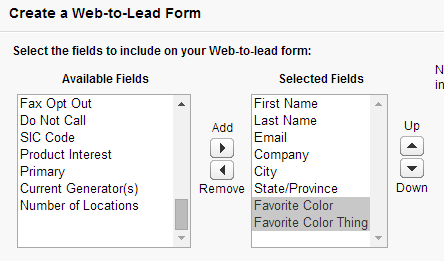
First, I've created a lead record type with two custom fields - Favorite Color and Favorite Color Thing. Then, I made Favorite Color the controlling field to Favorite Color Thing.

Important note! Any validation rules that you have setup need to be satisfied by the input you're flowing in via web-to-lead! If they are not satisfied, the lead will not import into your instance of Salesforce correctly. 

Favorite Color (controlling field) choices:
  • Blue
  • Green
  • Orange
  • Pink

Favorite Color Thing Dependent Choices:
  • Blue - Sky, Water, Blueberries
  • Green - Grass, Turtles
  • Orange- Tiger Lilies, Sunsets, Fall Foliage
  • Pink - Sky, Sunsets

I've also set Email to be required on the lead page layout.

Now, I go to Setup > Leads > Web-to-Lead, enable the functionality, click Create Web-to-Lead Form, and add the custom fields to the form.


When I clicked Generate, this is what was spit out by Salesforce. The HTML linked renders the pictured form below. Notice the dependencies I've setup in Salesforce did not come over. Additionally, none of the fields look required (or are required) on this form.


Layout Changes

Let's start with the easy fixes first. To create the aligned, pretty table that you see below, we need to add a table element.


For those who don't need explanations, here are quick steps. 

  1. Setup the Web-to-Lead fields in Salesforce.
  2. Grab the code that Salesforce spits out. 
  3. Encapsulate all of the input fields and field labels in a <table> tag. Read fully commented code here
  4. Add a <tr> tag before the first <label> tag to indicate you are creating a row in the table.
  5. Remove all of the <label> tags. For example, delete <label for "first_name"> and </label>.
  6. Separate the "guts" of the table into columns with <td> tags. For a visual, read fully commented code here
  7. Close the table row with a </tr> tag. For example, your final markup of the first row in the table is  <tr><td>First Name</td><td><input id="first_name" maxlength="40" size="20" type="text"/></td></tr>
  8. Rinse and repeat for all additional fields. 
  9. Close the table tag by adding </table> after the last row. 
  10. Optional: add a line break </br> before the Submit button.


For those who prefer to know more:

If you've ever used Word or Excel, odds are you know what a table looks like. We're using a table to create the view above, only we've set our borders to be hidden. Since we're using elements that are really typical and may be altered by your webmaster's Cascading Style Sheet (CSS) on the webpage you're posting to, you'll want to make sure that any styles are defined in your code unless you want your webmaster to handle font colors and whatnot. For more about CSS and styling HTML, check out w3schools.


Here's what we had before the table tags.


Here's our first row, including the table, tr, and td tags. 

A bit more detailed view of our selections in the table. Notice that our custom selects assign the field id for name and element id. Do not change this. 

When you view your table, it may or may not include the borders. To exclude the borders, modify your beginning <table> tag to be <table border="0">. Alternatively, you can modify the CSS on the page in the head element, then add a class to the table.  

I have uploaded the fully commented basic table code with helpful tips here


Required Fields

For those who prefer steps...
  1. Inside the input tag, add required = "true". For example,
    <input id="email" maxlength="80" name="email" size="20" type="text" required="true"/>
  2. Make the input field look required by adding a label tag and an asterisk to the end of the field name. For example,
    <tr><td>Email<label style="color:red;font-size:15px">*</label></td>

For those who would like to read more...

To make the fields required, we will add additional attributes to the input tags. This required attribute makes the fields required, but they won't look required until we add a required, red asterisk to the code. 


All we've done is found an input tag that we need to require, email, and added required="true" inside the tag. Now that it is required, we'll make it look required, too.

Remember, your webmaster may already have classes to use for forms like this, and this step may require that you speak with your webmaster about their site design. We've added the label tag to the first cell in the row because the font tag is not supported in HTML5 and I am trying to stay away from creating external CSS for sake of condensing this blog post. Most webmasters prefer to maintain external CSS, though, since it is a better way to ensure consistency throughout the domain.

To add the red asterisk to the end of the Email field's label, we added <label style="color:red; font-size:15px:>*</label> before the closing cell tag, </td>. The size does not necessarily need to be adjusted, but 15 pixels looked the best for our layout.


Conditional Picklists

For those who prefer steps:
  1. Add ajax and javascript to your head element. 
  2. Create the arrays for your parent picklist and child picklist values. 
  3. Add the "action" functions for the parent field. 
  4. Add the "action" functions for the child field. 
  5. Add a <div> element before the table.
  6. In the body of the table, modify the picklist for the child field. 
  7. Close the <div> element after the table.
I suggest everyone read the explanation or the fully commented code here


It's time for the fun part. Let's make our Favorite Color Thing picklist conditional, and dependent on Favorite Color. This step requires adding Ajax and JavaScript to our header element and modifying our selections a tiny bit with a div tag. 

First, let's define our relationships again. 

Favorite Color - Favorite Color Thing Dependent Choices:
Blue - Sky, Water, Blueberries
Green - Grass, Turtles
Orange- Tiger Lilies, Sunsets, Fall Foliage
Pink - Sky, Sunsets

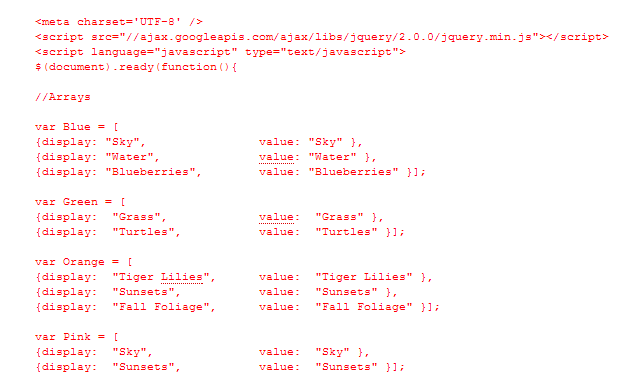
Now, we'll add the script and values to the header of our page. We've assigned each "parent" color selection to a variable, and list each "child" favorite color thing to its parent's array.


Notice we assign a display and a value. If you are creating a parent/child selection for country/state fields, note that Salesforce cares about the value you assign for state/province code picklists. For example, you can display "Florida" as a selection, but you need to assign the value to "FL" if your child is the standard state/province code field.

Next, we'll setup the action for these arrays. You can see we call to the Favorite Color field id then assign the variable favorite_color to it, just to make things easier to read. Our JavaScript will run on the id to insert the array values.We set the default below using the Favorite Color Thing field id. Our default option is blank.


We'll add the function that populates the values for the Favorite Color Thing field, depending on the parent Favorite Color that has been selected. We are using the Favorite Color Thing field id here.


Now, we'll update our table by adding a div tag outside of each of the table tags. 


And our last step is adding our updated Favorite Color and our Favorite Color Thing selects. Note, if you are not using dependent picklists, you should have options listed. 


Now, we have a form with required fields and dependent picklists. Our final code is available here

TIP: Before you finalize, test a few times. If you run into errors, uncomment the debug comments. If you have validations on the Lead object, they may negatively impact your creation of new leads. Make sure your required lead fields are included on the Web-to-Lead form - either as hidden inputs or as required fields for the user to complete.